Showing posts with label Micro ETL. Show all posts

Saturday, March 5, 2016

Recipes of Data Warehouse and Business Intelligence (Use case 02) - How to load a data file from network with control file

Analysis of the use case 2

This use case shows how to configure a data file that is present in a network folder (obviously it must be visible to the server that contains the Data Warehouse). Furthermore this file is coupled to the corresponding control file that, in order to be managed by MEF, must have the same name as the data file unlike its extension.
This situation typically occurs for two reasons.

1 - the feeding system can not (or do not want to do it) send the data file to the DWH
2 - the feeding system generates a data file that is used by multiple applications.


In this case we have take the data file (moving it or just copying it) and carry it to the
reception folder called rcv .
The control file contains no further information. His mere presence certifies that the file date is OK. We shall see, in a next use case, also in the case where the control file must contain the number of rows in the data file. This setting is preferable, as it allows us greater control on the consistency of the data file .
As in use case 01 follow the indications contained in the read_me file. Here I will describe in detail the sequence of operations.

Changes to MEF repository

In order to properly handle the move (or copy) of a data file from a network folder
to rcv folder, you can access to the Operating System using java functionality.
The original package mef_java was then modified to be able to execute
Operating System commands on both Linux and Windows. Consequently they were made of small interventions even on packages and mef mef_sta to use the new Java function.

Another intervention was necessary to also configure the information
"FIELDS TERMINATED BY" associated the Oracle external table. Ovviously, the data file can be constructed on very different systems between them, so some
settings can be valid on Windows but not on Linux and vice versa. The only thing
what we can do is to make configurable the feature of the external table and try to change the value if there are any problems.
In this use case, for example, the same data file, on Windows 64 had to be set as "0x 0d0a" but on Linux and Windows 32 as "NEWFILE". If the load gives error, try changing the value.

Before to start with configuration and run, do the work indicated in the read_me.txt to prepare the MEF environment.

Configuration of the data file

The data file used for this demonstration is that of the financial regulated markets
,downloadable from ESMA site (http://mifiddatabase.esma.europa.eu). For the purposes of demonstration, the network folder is instead a local folder that is initialized automatically after the installation of the MEF. 

You can safely try the use case with a your network folder, for example '\\ w2886038.bim.local \ shared'.
In this case, you must move the data file and the control file under the
'\\ W2886038.bim.local \ shared' folder and you have to change the pointing of the Oracle directory as follows:


CREATE OR REPLACE DIRECTORY
DWH_ESM_M_REGMAR_SRC AS
'\\w2886038.bim.local\shared';


The io_regmar.txt contains the setting for the data file. Set your correct value according to your Operating System. 

Configuration of the structure of the data file

The configuration is contained in the regmar.csv. There is nothing else to do. You have done all the work neeeded to process the data file. Connect to Oracle and run the configuration.

sqlplus etl/etl
SQL> @sta_conf_io REGMAR


Pre o post processing

Nothing to do.

Load of the data file

To load the data file, you must put it and its control file under the folder pointed from the DWH_ESM_M_REGMAR_SRC directory.
 

Thursday, February 25, 2016

Recipes of Data Warehouse and Business Intelligence (Use case 01) - How to load a data file with fixed length columns, dummy fields and transformation rules

Introduction

In the initial  example, we loaded the global financial market data files (MIC). One of the fields in the data file was the ISO country code in the 2-characters format. The international encoding of nations also provides a  3-characters format and a numeric format.
It 'important for a Data Warehouse, have all the standard codes, above all for information of a general nature as well as the codes of nations. This allows the Data Warehouse to receive and send data files to the outside world using a common coding language.
We can find on the internet the data file that contains these encodings (I used the http://www.chemie.fu-berlin.de/diverse/doc/ISO_3166.html site but you can find others. I used this example because with a simple copy and paste, I created a txt format data file with fields at  fixed  lenght.
This data file, after being loaded into the Staging Area, will be a good candidate to become the dimension table of nations. This dimension must have a unique key field on which to build the dimensional key. In the case where, like this, there are more ways to identify the nation uniquely, we need to decide on a single one and use it as a standard for the whole Data Warehouse. We decide to define as a unique key the ISO code the 3-characters format.
In the sample of financial markets (MIC), there is the 2-characters format code. Suppose that, since the MIC will become a dimension of analysis, we want to include  the ISO 3-characters format code and its related description.
The objective is to show how to use MEF for
•    Load the data file of the nations in format with fixed-length fields.
•    Set up a trasfomazion rule on a field
•    Configure the fields that are not in the MIC data file.
•    Use the post processing
Do all this, it is very simple. It takes a little work.

1 - It starts as usual, by configuring the COUNTRY data file and placing the sample file in the \dat.
2 - Run the load.
3 - Change the configuration file of the MIC structure, adding dummy fields. These fields will not be present in the file date, but will be created in the Staging Area table.
4 - We use the post processing package, which always runs even if it has nothing to do, to write the plsql code that will fill the added fields. 
The data file and the related configuration files, you can download from https://drive.google.com/open?id=0B2dQ0EtjqAOTQzZSaUlyUmxpT1k. Under the folder of Use Case. Follow the read_me instructions.
We see in detail these steps.

The COUNTRY configuration

The configuration  of the data file is performed by opening the io_country.txt file  located in the \cft, and setting the following values.

IO_COD:COUNTRY
IO_DEB:ISO 3166 Codes (Countries)
TYPE_COD:FIN
SEC_COD:ISO
FRQ_COD:M
FILE_LIKE_TXT:countries%.dat
FILE_EXT_TXT:countries_22-02-2016.dat
HOST_NC:.,
HEAD_CNT:3
FOO_CNT:0
SEP_TXT:
START_NUM:11
SIZE_NUM:10
MASK_TXT:DD-MM-YYYY
TRUNC_COD:1

Since the data reference date is inside the file name (countries_22-02-2016.dat), we need to set the size properly MASK_TXT: DD-MM-YYYY. The date starts at the eleventh character  (START_NUM:11) and is long 10 (SIZE_NUM: 10).
I plugged in the data file 3 header lines, so there is HEAD_CNT:3
Since it is a data file with fixed length fields, leave blank the information of the SEP_TXT separator.
The configuration of the structure of the data file, was performed by opening the file country.csv under the folder \cft
We see in the figure only the columns that need to be setted.


The first 4 lines setup the fields according as they are present in the data file. They have a fixed length which is affected by the amplitude of the column headers (HOST_LENGTH_NUM), but in the Staging Area table,  I want to have the real length, ie the one that is obtained with the sum of
HOST_LENGTH_NUM with STA_OFF_NUM.
We set the control of the congruence for all fields that do not undergo the rules (CHK_FLG) and we set the fields that make up the unique index (UI_FLG). After loading the Staging Area table, you will create the unique index. This is to prevent, immediately, that may be present duplicate keys.
At line 5, we insert the field in more that it is not found in the data file. (The COLUMN_COD FILE is null). Also, because we want the nation numerical code is just a number (not a number with leading zeros) we set a rule change. This rule will be used in the creation of the view that the processing module will use for loading the staging table.
Now, open a shell and :

Microsoft Windows [Version 6.0.6002]
Copyright (c) 2006 Microsoft Corporation.  All rights reserved.

E:\>cd projects\dwh\mef

E:\projects\dwh\mef>sqlplus etl/etl

SQL*Plus: Release 12.1.0.1.0 Production on Wed Feb 24 10:41:25 2016

Copyright (c) 1982, 2013, Oracle.  All rights reserved.

Last Successful login time: Tue Feb 23 2016 09:28:53 +01:00

Connected to:
Oracle Database 12c Enterprise Edition Release 12.1.0.1.0 - 64bit Production
With the Partitioning, OLAP, Advanced Analytics and Real Application Testing options

SQL> @sta_conf_io COUNTRY

PL/SQL procedure successfully completed.

Disconnected from Oracle Database 12c Enterprise Edition Release 12.1.0.1.0 - 64bit Production
With the Partitioning, OLAP, Advanced Analytics and Real Application Testing options

E:\projects\dwh\mef>


Load the COUNTRY data file
Reconnect to SQL*Plus and run the load:

E:\projects\dwh\mef>sqlplus etl/etl

SQL*Plus: Release 12.1.0.1.0 Production on Wed Feb 24 11:08:01 2016

Copyright (c) 1982, 2013, Oracle.  All rights reserved.

Last Successful login time: Wed Feb 24 2016 10:41:26 +01:00

Connected to:
Oracle Database 12c Enterprise Edition Release 12.1.0.1.0 - 64bit Production
With the Partitioning, OLAP, Advanced Analytics and Real Application Testing options

SQL> exec mef_job.p_run('sta_iso_country');

PL/SQL procedure successfully completed.

SQL>


The MIC reconfiguration

We must change the structure of the MIC data file by inserting the extra fields, as we have done in the fifth row of the COUNTRY configuration. Doing so is very simple, because you just do a copy and paste of the lines 3 and 1of COUNTRY. (With FILE_COLUMN_COD and UI_FLG changed to null).


After changing the configuration file of MIC, run the configuration script.

SQL> @sta_conf_io MIC

PL/SQL procedure successfully completed.

Disconnected from Oracle Database 12c Enterprise Edition Release 12.1.0.1.0 - 64bit Production
With the Partitioning, OLAP, Advanced Analytics and Real Application Testing options

E:\projects\dwh\mef>


Setting of the new fields PAE_DEB and PAEISO3_COD with the post-processing


Needless to say that in order to update these fields, you must first be loaded the COUNTRY data file. This setting is a typical post-processing operation. I have opened the temp_dwh_sta_iso_mic_ppk.sql file, present under the \sql folder, and modify it as follows.

create or replace package dwh_STA_ISO_MIC_PPK as
procedure p_main;
end;
/
create or replace package body dwh_STA_ISO_MIC_PPK as
pv_pkg varchar2(30) := 'dwh_STA_ISO_MIC_PPK.';
pv_error   exception;
pragma exception_init (pv_error, -20058);

procedure p_upd_iso is
   v_mod varchar2(61) := pv_pkg||'p_upd_iso';
   v_count number;
   v_upd number;
   v_msg varchar2(500); 
begin
   select count(*) into v_count
   from dwh_sta_iso_mic_stt;

   update dwh_sta_iso_mic_stt d
   set (paeiso3_cod,pae_deb) = (
       select paeiso3_cod,pae_deb
       from dwh_sta_iso_country_stt s
       where d.paeiso2_cod = s.paeiso2_cod
       )
   where exists (
      select paeiso3_cod,pae_deb
      from dwh_sta_iso_country_stt s
      where d.paeiso2_cod = s.paeiso2_cod
      );
   v_upd := sql%rowcount;
   v_msg := 'Updated '||v_upd||' countries on '||v_count;  
   if (v_upd <> v_count) then
      v_msg := v_msg||chr(10)||'Attention ! Some contries ('||
      to_char(v_count-v_upd)||') without description and ISO3 code';
   end if;
   mef.p_send(v_mod,v_msg);
   mef.p_mail('INFO','Staging Area Informational ('||v_mod||')',v_msg);
exception
   when pv_error then raise;
   when others then mef.p_rae(sqlerrm,v_mod); 
end;

procedure p_main is
   v_mod varchar2(61) := pv_pkg||'p_main';
begin
        if (mef_job.pv_wr.repeat_cnt > 0) then
      mef.p_send(v_mod,'Start');
      p_upd_iso;
      mef.p_send(v_mod,'End');
   end if;
exception
   when others then mef_unit.p_exc(v_mod,sqlerrm);
end;
end;
/


I have closed the file and I have renamed it, without the initial "temp_".
I have already done for you: you must only download the file, move it under the \sql folder, and compile it.

E:\projects\dwh\mef>sqlplus etl/etl

SQL*Plus: Release 12.1.0.1.0 Production on Wed Feb 24 11:16:35 2016

Copyright (c) 1982, 2013, Oracle.  All rights reserved.

Last Successful login time: Wed Feb 24 2016 11:08:01 +01:00

Connected to:
Oracle Database 12c Enterprise Edition Release 12.1.0.1.0 - 64bit Production
With the Partitioning, OLAP, Advanced Analytics and Real Application Testing options

SQL> @..\sql\dwh_sta_iso_mic_ppk.sql

Package created.


Package body created.

SQL>


As you can see, the code performs a simple update of the Staging Area Table, taking the values from the dwh_sta_iso_country_stt table. Because we want to be notified if there are nations who have not found a description, add a new email code in the configuration table  MEF_EMAIL_CFT, which will be used by  mef.p_mail call.From  SQL * Plus give:

Insert into MEF_EMAIL_CFT (EMAIL_COD, FROM_TXT, TO_TXT, CC_TXT, SUBJ_TXT, STATUS_COD)
Values ('INFO', 'mef@microetlfoundation.com', 'massimocenci@outlook.com', 'massimo_cenci@yahoo.it', null,1);
COMMIT;

Of course, change the email address with yours. We can now reload the MIC file. We enter SQL * Plus and give:

SQL> exec mef_job.p_run('sta_iso_mic');

PL/SQL procedure successfully completed.

SQL>

 
We see (in this image fragment) that the MIC Staging table has new values in the added columns.


 Since there are some cases of country codes not found, we received the informational email:


Wednesday, February 24, 2016

Designing, building, loading and managing a Staging Area for an Oracle Data Warehouse. In 20 minutes.


I briefly summarize what I have described in the presentation, with the same name, on Slideshare.

In the recent years, I have tried to explain and share a vision of the Data Warehouse which I defined as Micro ETL Foundation (MEF). MEF was born as a set of ideas, tips and methods to be able to successfully implement a project of this type.

The main guideline was the simplicity. This was the most difficult point to be maintained, because a project of Data Warehouse and Business Intelligence is extraordinarily complex.I have shown in various articles, that even small details such as the descriptions of the codes or the null values management can weigh heavily on the final outcome of the project.In fact, in my opinion, the real complexity lies in being able to simplify  the complexity.

It is now time to collect and put together organically and usable in real life, everything that I wrote, giving a consistent life to the Micro ETL Foundation transforming it into a an ecosystem to be used by all in a simple and free way.
The implementation was carried out using the internal language of the database (pl / sql) and  it is addressed to an Oracle Data Warehouse builted in Windows (and Linux) environment, but the underlying philosophy can be easily adapted to any RDBMS and any Operating System. 

The use of a well-defined Naming Convention has been decisive for the creation of models useful to the automatic generation of all the objects that constituting the system. We can then define MEF as a "Naming Convention-driven" ecosystem.

The focus will be on the Staging Area, because, for me, is one of the main components of a Data Warehouse, the basis (according to the Kimball approach) on which we can build the next components, ie the Dimensions and the Fact tables. The example described is the load of a simple file in csv format.

The MEF ecosystem is downloadable at https://drive.google.com/open?id=0B2dQ0EtjqAOTQzZSaUlyUmxpT1k
The use case is described on Slideshare:
http://www.slideshare.net/jackbim/recipe-14-of-data-warehouse-and-business-intelligence-build-a-staging-area-for-an-oracle-data-warehouse-1?related=1
http://www.slideshare.net/jackbim/recipe-14-build-a-staging-area-for-an-oracle-data-warehouse-1

Now I will describe how to use it with others practical examples.

Saturday, March 7, 2015

How to identify and control the reference day of a data file

Introduction
In a presentation of some time ago [1], I had highlighted the importance of the control between the reference day and the expected one of a data file received from the host system. Given the importance of the topic, I would further deepen both the meaning of the control and the identification of the reference day of the data.
This argument may seem strange, or too technical, mainly for those who are not very experienced about Data Warehouse, or for those they are to his first experience. I'll try to simplify the concept it as much as possible, because this it is a very useful example to understand the pitfalls inside the ETL process.

Example
To understand the problem, we assume a similar example of practical life. Suppose that you receive every morning, from your bank, via email, the list of the operations of your checking account.
So, you receive daily an excel spreadsheet with the movements of the previous day. The reference day of the operations, is located in the subject of the email, for example: "Operations of the 03/12/2015".
Obviously you do not check your email from the bank every morning: you have created an automatic mechanism that opens the email, and load the daily operations, with the day  indicated in the subject of the email, in the database of your household expenses. Only at the start of the month, you start to do your analysis about the previous month.
The questions  are:
What guarantees do you have, that the email arrive to you every day?
What guarantee do you have that the day, in the subject of the email, definitely makes always reference to the day before?

The importance of the control
If we are not able to answer the questions above, we have no guarantee about the validity of our analysis.
This is the reason why the control is important. That's why we have to be absolutely sure that the day that we are loading is exactly what we expected. And, before that, we have to verify that what we expected, has arrived. We should not assume that everything spins smoothly, because it is always possible that an anomaly occurs. Both in the source systems that in our systems.
Do not forget, that in the face of a problem, we are always us, understood as the Data Warehouse team, the first interlocutors, the first people to which requires explanation. In practice, in the eyes of end-users, we are the cause of the problem. Those who had to control and they did not it. Here are two examples that may occur. (and in fact they are occurred to me in the past).

Problem 1
In the source system there has been some revision or changes in the extraction plans (no one is forced to alert you), so an error rises in the data filter. Consequence: the data file is daily generated correctly, but the reference day inside the flow is wrong. We don't know the cause. The reference day may remain fixed, backward a day, equal to the system date, or refers to a field different from the previous data file. Only if we check the reference day with the expected day we realize the error.

Problem 2
The ETL process, via ftp, copies the file from the host system folder to a local folder to process it. Suppose that the host folder, which is a folder also used by other systems, for reasons of maintenance or space, starting from a certain day, is no longer used, replaced by another folder. Nobody warns you, the old folder is still visible, and the Data Warehouse, the day after the exchange, continues to feed itself from the old folder. Also in this case, to have an immediate control of the reference day is crucial.
Moreover, if the data you are loading erroneously always for the same day, are mixed with other data that instead change daily, discover this kind of error cannot be immediate and may take several days.

The solution
The proposed solution to control the congruence between the reference day and the expected one, was very minimal, according to the rules of an "agile" vision for the construction of a Data Warehouse [2]. Were sufficient a metadata table and a log table. We can graphically represent its logic in the following figure. In practice, we can use a configuration table, of "calendar" type. In it, each calendar day, is associated with the expected day of  the daily data source and with the reference day loaded.
A log table shows, at the end of the daily load, the congruence of the two days. The physical names are constructed according my standard of naming convention.


The basic elements
The elements involved in this control are thus three. The first is the calendar day. The second is the awaited day inside the daily flow. We must configure it on the basis of  the flow analysis. We know their logic, so we can easily configure the awaited day. For example, if the data file is not expected at the weekend, the saturdays and the sundays of the calendar will not be setted as expected days.
The third element in the game is the reference day inside the data file. That is the day to be compared with that expected for the verification of congruence.

The reference day of the data
Now focus your attention to the third element, the reference day of the data . Where is this information?
It would be nice to think to a rule that the day is always present directly as a column of the file. This should be a rule, an underlying condition.
Unfortunately in a Data Warehouse, as usual, nothing is simple, and the reference day, most of the time, is not a column of the data file. The rule that we have described, it may be applied only if we are lucky enough to be able to decide ourselves the structure of the source files. Most often, though, we'll have to re-use (to save money, of course) data files already existing, created with different rules. Let's see what are the situations that surely we will face.

  • The day is a column of the data file
  • The day is in the header of the data file
  • The day is in the tail of the data file
  • The day is in the data file name
  • The day, there is not.


The day is a column of the data file
This is the most simple and easily manageable case. The day is a column of the data file. For example, a recording date, an execution date of an order, a fiscal date. Typically you can find this situation in the data files that will become, at the end of the ETL process, the fact tables.

The day is in the header/tail of the data file
Typically you can find this situation in standardized flows, already present, generated on the mainframe, by programs written with Cobol language. These files can have various lines in the header/tail with a lot of information in it, including the reference day. In fact, the reference day, usually, is the date of the generation of the data file. However, if the data are of anagraphical type (like the features of the customers), we can think that it is the same of the reference day.
Think of a customer data file. If the data extraction start at 22.00 of the day 2015/03/31, we may think that it freezes the daily situation of the customers at the 2015/03/31; therefore the extraction day is the same of the reference day. Caution, however, the cases in which the extraction starts after the midnight. In this case, the reference day is equal to the extraction day minus 1 day.

The reference day is inside the file name
This is a fairly common event, typical above all for data files in csv format.

The reference day is missing
We must also consider this case. Sometimes the data file is generated with the same name, (therefore exclude the case above), may have a header/tail, but without the information that interests us. We can only rely on the system date of the Data Warehouse server.

The importance of the metadata
Let us now see how to provide a method to handle these situations. It is easily implemented using only a bit of the language of the database (for example, the pl/sql of Oracle, but these techniques can easily be adapted to any database) and a bit of metadata.
Metadata, logical term very sophisticated and intriguing, that hides what we call trivially configuration tables, are essential to manage the case studies we have described. The metadata needed to identify and extract the reference day are:
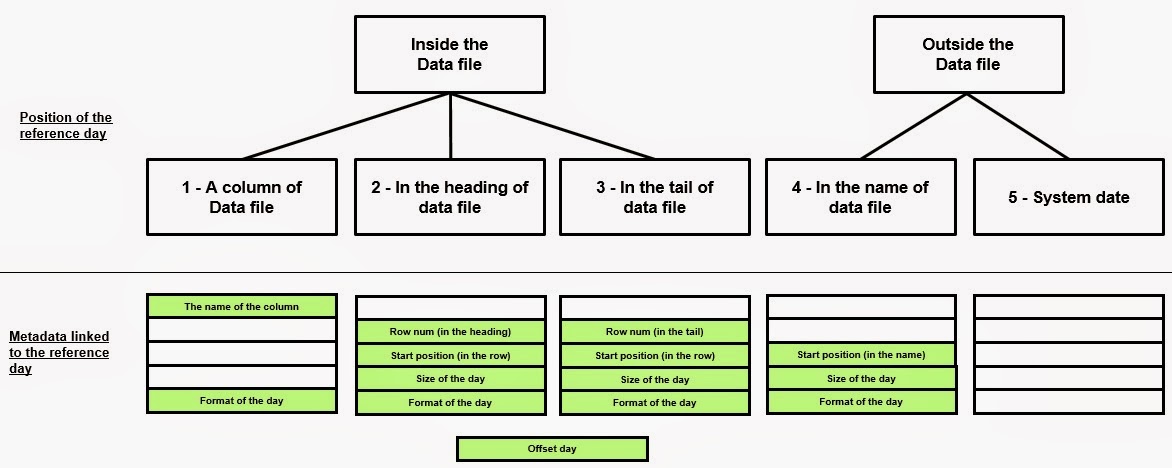


  • ref_day_cod = fits here, if there is, the name of the column that contains the reference day.
  • row_num = with this number we denote the offset of the line, from the beginning of the data file, if it is in the header, in which we find the reference day. The number will be negative in the case where the reference day is in the tail.
  • start_num = with this number we indicate, within the row_num, the position of the starting character of the reference day.
  • size_num = with this number we indicate the size of the day. If in the YYYYMMDD format, will be 8, in the DD-MM-YYYY format is 10. Avoid using the months in text format.
  • for_txt = with this string we indicate the date format of the reference day. For example 'yyyy-mm-dd'.
  • off_num = with this number we indicate the offset (in days) of the reference date. This information is useful in the case where the generation of the flow and its processing is performed on different days. Let's take an example. Today is the day 14 and start  the processing of the data file. The flow was generated yesterday at 22:00, The day 13 is in the header, and we assume that this is the day of the reference data. In this case off_num must be equal to zero. Suppose now that the generation of the data file takes place after midnight, for which we find in the header the day 14. In this case off_num must be set = -1, because even if the generation and processing of the flow occurred after midnight definitely the master data refer to the situation of the day 13. This, in brief, is the need for this metadata.

Now complete the previous figure with an example of the corresponding data files.


How to use the metadata
Define the metadata, place them in a configuration table of all data files and fill the content, it is not a "passive" activity . That is, not only serves to document the structure of the data files, but it is also "active" information, because it can be used in the ETL programs.
Let's take a concrete example very simple. A data file, it is only a sequence of lines structured in data columns. We can represent it as:


The first thing to do in order to load the data file into the Staging Area is to build an external table that "sees" the data file, with the same columns plus the technical field <IO> _row_cnt, that simply gives a number to each row. <IO> is the input file code.
The Staging Area table must obviously have the same columns of the external table plus the reference day DAY_COD. If the day is already in the data file, it does not matter. Always insert an additional DAY_COD column. At this point, you can create a function that, having as input the IO_COD, uses the metadata table and extracts the value of the reference day to be loaded in the DAY_COD of the Staging Area table.


Conclusion
I have already had occasion to emphasize the importance of the reference day of the data. A mistake on his identification may jeopardize the validity of the whole Data Warehouse. Do not forget that:
the versioning policies of the dimensional tables (slowly changing dimension of type 2) are based on the reference day.
the fact tables are partitioned using the reference day. An error in the initial phase can be very costly in the following stages of the project. So, beyond the technical solution, the identification and control of the reference day is a very important issue in a Data Warehouse project.
The management of the reference day, just as the "NULL" management[3] and as the description of the codes [4], which I have already spoken at length, seem unimportant arguments and of little interest.
But, to ignore them, is very dangerous, and may be the cause of many failures in the worst case. Or heavy delays in the deploy in the best cases.

References
[2] http://www.slideshare.net/jackbim/recipe-11-agile-data-warehouse-and-business-intelligence


Friday, July 25, 2014

What you know about ETL process is wrong

The ETL process 
The title you have just read, is deliberately provocative. Of course not everything is false. My intention is to try to see the things from another point of view.  Don't  take anything for granted, and try to read some axioms, typical of the world of the Data Warehouse, in a critical way.
I will try to provide a different view of reality, questioning the individual letters of the ETL paradigm. It is therefore necessary to investigate in more detail the meaning of the ETL process.
We can find many definitions of the ETL process. In general, it is an expression that refers to the process of Extraction, Transformation  and Load of input data into a Synthesis System (Data Warehouse, Data Mart ...) used by the end users.
This is a very general definition, which does not helps us to understand the work that we face. A simple design can help you to understand the process.


The data that are in the structures of the Operational Systems(OLTP), are extracted, transformed and loaded into the the Data Warehouse structures.
In recent years, it has also sets another definition of the loading process. Its difference is the inversion of the "L" with the "T", that is, the implementation of the transformation phase AFTER the extraction phase.
This trend is related to the need to charge increasingly large amounts of data, and to the ability to treat this data, using the ETL tools. Many data transformations, maybe performed "on the fly", ie in memory, or with the help of temporary tables, can be problematic.
You have less problems to load the data file as it is, in a staging table, and then apply on it, this transformations.

The ambiguity of the ETL and ELT processes
As part of my considerations on the Micro ETL Foundation, the ELT approach is more in line with his philosophy. There must be a close relationship between the input data file and the Staging table. This ratio must be 1:1 and the flow must be as complete as possible.
Despite the ELT approach is better, this does not mean that it is the correct one. Of course, on the Internet you can find various articles and comments relating to the pros and cons of the two approaches.
In my view, however, the reality is different. The problem is not to decide whether to make the changes before or after loading. The problem is that both processes need to be revised. This is because, if we look carefully :

  1. The extraction step doesn't exists.
  2. It lacks the configuration and acquisition step.
  3. It is not convenient the transformation phase
  4. It is not clear how to do the loading, and where to do it.

Thus, although we can continue to speak generically of ETL (or ELT) because it is basically an acronym universally known for years, we must be aware that the name is misleading in case you want to set a baseline with the three phases into a project  Gantt, with the estimates associated.
Let us then to justify the 4 previous points.

1 - The extraction step doesn't exists
Is there a very real extraction activity in charge of the development team of the DWH? I think not. In most cases, the feeding systems are external systems that reside on mainframe, perhaps with different operating systems, and different database programming languages.
The extraction phase of the data, the "E" of the Extract word, is always in charge to the feeding system, which knows how to produce the flow. The Data Warehouse team must instead deal with two activities.

  • The activity of Acquisition or Transfer, namely the placement and storage of the input data files into well-defined folders in the DWH server. All this, with a pre-established naming convention.
  • The analysis of the contents of the data file, that is what  the feeding system must produce. This, if we're lucky. Otherwise, because generate new data files costs money,  you will have to reuse or integrate already existing data files.

The relationship with the external systems, using the transfer of data files, is used by most of the Data Warehouse projects. The CDC (Change Data Capture) situations are not so frequent, however, and do not cover the whole loading phase.
There are also rare cases, in which the DWH team builds the extraction statements and runs them directly, using a database link.
This should not be done for safety reasons, for performance reasons (who knows the indexing structure into the external systems ?) and for reasons of liability (if the data are not loaded, where is the problem?).
And also for scalability reasons. In times of budget cuts, it is increasingly common for the "IT people" to change the transactional systems or part of the source systems.
Having a source configuration which remains stable to which the external systems must adapt it, is definitely a choice that maintains the stability.

2 - It lacks the configuration and the acquisition step
The first step to be taken into account (and it is not simple) is the definition phase of the data files and their configuration in the metadata tables. It will be the feeding system to provide us the definitions using word documents, excel, pdf or other.
We must also give a unique identification of the data file, not numeric, valid for all feeding systems. It 'important that the name will be unique.
If we have a data file of financial operations, let's call it,for example, TMOV. If we have multiple data files, such as daily, monthly, quarterly, etc, let's call them DTMOV, MTMOV, QTMOV. If we have two systems that provide the daily financial operations, let's call them XDTMOV, YDTMOV to distinguish them, but we must have always a unique name as a reference.  On it we will build a primary key.
In this phase, we will have to configure all of the characteristics of the data files, not only their columnar structure.

3 - It is not convenient the transformation phase
We now analyze the letter “T”, that is the "Transform" component of the process. My opinion is that we should not talk about transformation, but of enrichment of the data.
To transform the data, means make them different from the original one: this has, as a consequence, a difficulty in the control of the data.
We must always be able to demonstrate that the data that we have received in input is identical to what we have loaded into the Data Warehouse. Immediately after the deploy into production, certainly we will have to answer to several check requests.
If the original data has been transformed, we will have to spend much time to restore the original data files (maybe already stored on tapes) and redo the tests. If we preserve the original data and enrich them with the result of the transformation, we will be able to respond more efficiently and faster.  So my suggestion is:

Keep the original data into the Staging Area tables  (and, if possible, even after).
Do not make changes to the existing data, but add the columns that contain the transformation result.
Enrichment is the right word. I execute the enrichment  by transforming or aggregating different data as consequence of the requirements.
Implement the enrichment step not as a staging phase, but as a phase of post-staging, ie only at the end of the whole loading of the Staging Area. This is because, often, the enrichment involves the use of data from other staging tables. To avoid implementing any precedence rules or supervision of arrivals, it is certainly preferable to wait for the completion of the entire staging process.

4 – How and where to load
The phase of the loading is very generic, since it does not say where to load the data. We should decide where to load immediately, because this choice will determine which, of the two fundamental approaches in the field of Data Warehouse, will be adopted.
Many years have passed, but this choice will continue to divide the international community. Innmon approach or Kimball  approach?
We want to have a comprehensive architecture of ODS (Operational Data Store) that retains more detail data and a dimensional architecture for synthesis data, or we prefer to have a single dimensional structure for both? Everyone can decide according to his own experience, your own timing and your own badget.
However, regardless of the method used, surely the first structure to be loaded is the Staging Area, which at first, will welcome the input data files. The Staging Area is a very vast topic. Just some suggestion.
The loading of the staging tables should be as simple as possible. A single direct  insertion, possibly filtered by some logical structure, from the data file into the final table. Some small "syntactic" transformation can be done, but it must be of formatting, and not of semantic.
The loading must always be preceded by the cleaning of the staging table. Do not load into a staging table, multiple data files (more days, for example) of the same type, that, for some reason, have not been loaded and they have accumulated. If you can, always process them one at a time.
If it is necessary, you can aggregate them, by hand or with an automatic mechanism, into a single data file. Do not forget that we have to perform very accurate control of these flows.
So, even a trivial control on the congruence between the number of rows loaded and those present in the data file, it will be much more difficult if the staging table contains the rows of several input streams.

Conclusion
So in conclusion, keep in mind that, in practice, ETL hides a different acronym, which can be summarized with: CALEL

  • Configuration
  • Acquisition
  • Load (Staging Area)
  • Enrichment
  • Load (Data Warehouse)

But, as CALEL  is just horrible, we can continue to call it, ETL process. All this we can represent graphically in this way: